
5 Free Dr. Seuss SVG Files for Cricut Crafts
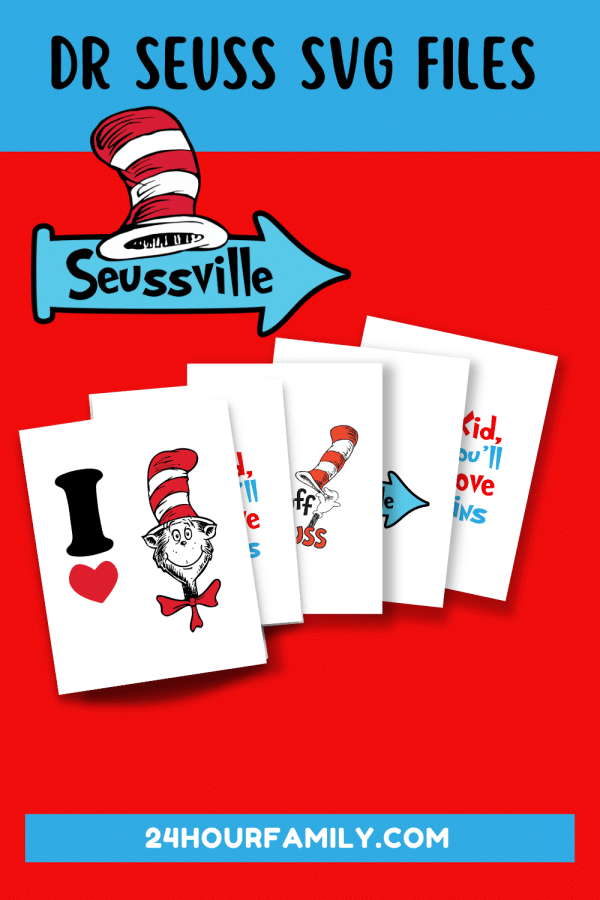
Add a playful touch to your reading celebration with these free Dr. Seuss SVG files. This collection includes five colorful options inspired by familiar characters, encouraging Seuss quotes, and the unmistakable red, white, and blue palette associated with these classic stories.
This free SVG collection can be used to create Seuss shirts, signs, tote bags, bookmarks, party decorations, and other personal DIY projects. Open your preferred Seuss SVG in compatible cutting software, then resize it to fit the item you plan to make.
5 Free Dr. Seuss SVG Files for Cricut Crafts
These Seuss-inspired graphics are especially fun for celebrating Seuss Day, Read Across America Day, or March 2nd activities at school or home.
What Is Included in the Download?
The free download includes five full-color options in two formats:
- SVG files for Cricut, Silhouette, and other compatible cutting software
- PNG files for printing, sublimation, and Print Then Cut projects
Each image is supplied as an SVG file and a PNG. No EPS or DXF versions are included in this SVG bundle.
Reading Quote
This quote SVG combines Thing 1 with a colorful message about reading, learning, and discovering new places. It would work especially well on a reading sign, library tote, notebook cover, poster, or book-corner decoration.

Seussville Arrow
The second Seuss SVG features the familiar striped hat above a bright blue Seussville arrow. Use this day SVG to make a directional sign for a book event, door display, birthday party, or themed reading area.

Hats Off
This red, black, and white Dr Seuss SVG combines a tall striped hat with a celebratory “Hats Off” message. It is a fun option for Seuss Day, a reading achievement celebration, or a bulletin board.

Cat and Heart
This simple cut file uses a large black letter, a red heart, and the Cat in the Hat. Its bold shapes make it suitable for a t-shirt, sign, bag, or other handmade item where you want the image to remain easy to see from a distance.

Move Mountains
Thing 1 and Thing 2 appear beside an encouraging message in the fifth option. This Thing 1 Thing 2 SVG works well for school milestones, reading goals, graduation crafts, or a motivational display.

Supplies You May Need:
The exact supplies will depend on what you want to make. Here are some common options:
- Cricut or Silhouette cutting machine
- Cutting mat
- Weeding tool
- Permanent adhesive vinyl for signs, cups, or notebooks
- Heat-transfer vinyl for shirts and fabric bags
- Cardstock for banners, bookmarks, and paper decorations
- Blank shirt, tote bag, sign, or other project surface
- Heat press, EasyPress 2, or household iron, if permitted by the material manufacturer
- Transfer tape for adhesive-vinyl projects
A Cricut Maker or Explore Air 2 can handle many of these SVG cut files. Some crafters may also use compatible vector artwork with a laser machine or Glowforge when the material and usage rights allow it.
Always follow the instructions provided with your material, blank, printer, and heat-transfer equipment.
How to Upload an SVG to Cricut Design Space
- Download the ZIP folder to your computer or device.
- Open the compressed folder and save its contents to your device.
- Launch Cricut Design Space and create a blank canvas.
- Select Upload, followed by Upload Image.
- Choose the SVG file from the extracted folder and add it to your Canvas.
- Resize the complete graphic while keeping its proportions locked.
- Check the Layers panel before cutting. Each color may appear on a separate layer or mat.
- Choose the correct material setting and follow your machine’s on-screen instructions.
Select the format that works best for what you’re making. Use the SVG version for layered vinyl and other cut projects.
The printable image version is better suited to printing, sublimation, or Print Then Cut instructions. If a PDF is also provided with future printables, it should generally be used for printing rather than layered cutting.
Making a Shirt With Heat-Transfer Vinyl
These colorful graphics can be made with multiple shades of heat-transfer material, but small details may require careful cutting and weeding.
- Upload the SVG file and resize it for the shirt.
- Separate or confirm the individual color layers.
- Turn on Mirror before cutting each heat-transfer mat.
- Place the material according to the manufacturer’s directions. For most traditional iron-on products, the shiny carrier side faces the mat.
- Cut and weed each color.
- Arrange the layers on the shirt before applying heat.
- Press them in the correct order using the temperature and timing recommended for your specific material.
Avoid repeatedly applying the full pressing time to every layer. Too much heat can cause shrinking, create gaps, or damage previously applied sections.
A Dr Seuss teacher shirt can be a fun choice for school celebrations, while matching Seuss teacher and student apparel can add a playful touch to themed events.
Project Ideas for These Free Dr. Seuss SVG Files
Reading Celebration Shirts
Add one of the graphics to a child-size shirt, teacher shirt, or volunteer top. Measure the blank before resizing the image so it does not appear too small or extend into the seams.
For more Seuss shirts inspiration, choose artwork with large shapes and a readable font so the finished image stays clear on fabric.
Classroom Signs
Use permanent vinyl on a painted wooden sign or print an image on cardstock and frame it. The Seussville arrow would be especially cute near a library or book corner.
Book Bags
Apply a graphic to a canvas tote that children can use for library visits. A themed tote also makes a practical gift for a teacher or young reader.
Bookmarks
Shrink a simpler image to fit on cardstock, laminate the finished bookmark, and add a ribbon at the top. Highly detailed artwork may need to be printed rather than created from several layers of vinyl.
Bulletin Boards
Print the artwork as focal pieces for a reading display. Add student book recommendations, goals, or favorite-book responses around them.
Stickers
If you have a compatible printer and machine, use the printable version with Print Then Cut to create stickers for notebooks, reading logs, or personal craft projects.
Party Decorations
The graphics can also be used for banners, favor tags, cupcake toppers, or food-table signs at an authorized themed birthday celebration. Keep small decorations away from preschool children when they include sticks or other potential choking hazards.
You could pair these pieces with other ideas about Dr Seuss, such as a Green Eggs and Ham display featuring an egg graphic, themed bookmarks, or simple reading printables.
Tips for Better Results
- Confirm the file type before choosing your project. SVG cut artwork is generally best for layered cutting, while printable artwork can be useful for printing.
- Resize the entire grouped image instead of changing individual pieces.
- Make a small test cut before using expensive vinyl.
- Avoid reducing intricate artwork too much because narrow lines may become difficult to cut and weed.
- Use low-tack transfer tape for paper and an appropriate transfer tape for adhesive materials.
- Check spelling, font placement, and image orientation before cutting.
- Mirror only heat-transfer projects—not ordinary adhesive decals.
- Check whether the background is transparent when preparing artwork for printing or sublimation.
- Review the license before making anything you intend to sell, distribute, or use for fundraising.
More Reading Crafts and Printables
Continue your celebration with these activities:
- Dr. Seuss Coloring Pages
- One Fish Two Fish Craft
- Thing 1 and Thing 2 Craft
- Cat in the Hat Handprint Craft
- Cat in the Hat Hat
These five Seuss SVG files offer plenty of possibilities for colorful reading crafts, decorations, and personal projects. Choose your favorite, check the included formats and usage terms, and tailor the size and material to the item you want to create.
What Does an SVG File Type Mean?
It uses scalable graphics that remain clear and crisp at different sizes. This vector format can be enlarged or reduced without becoming pixelated, making it useful for cutting-machine projects.
Can These Files Be Uploaded to Cricut Design Space?
An SVG can be opened in compatible software for layered cutting. A PNG can also be added, but it will normally be used as a single printable image or cleaned up as a basic cut image.
Why does my downloaded image have a white background?
The preview images shown in this post have white backgrounds. A properly prepared SVG does not need a white rectangular background. If the actual folder contains only the preview image, it may require background removal or need to be used as a Print Then Cut graphic.
Should the Image Be Mirrored?
Mirror the image when cutting heat-transfer or iron-on material. Do not mirror a standard permanent-vinyl decal unless your project specifically requires placement on the reverse side of a transparent surface.
Can I sell products created using these files?
A free download does not automatically grant permission for commercial use. Character artwork, quotations, book titles, and brand names may be protected by copyright or trademark. Sell finished products only if you have clear written authorization covering the artwork and the intended commercial use.
Can I share the download with another teacher or parent?
Send them the link to this post rather than emailing or reposting the digital files. They can then review the current terms and access the resources directly if permitted.
